

Irregular Loans - Example 1 |

|

|

|

|
||
|
Irregular Loans - Example 1 |
|
|
|

|

|
Irregular Loans - Example 1
|
Irregular Loans - Example 1 |
|
|
|
|
||
|
Irregular Loans - Example 1 |
|
|
|
|
|
|
|
||

Although most loans and mortgages are set up with a fixed rate of interest and
a fixed payment schedule, often the loan payments are not made on a regular
basis. This is because the borrower sometimes becomes delinquent or misses a
payment for to some reason.
On the other hand, lenders also work with borrowers to set up special payment
schedules that are not always fixed to the lenders’ schedule but more suited to
the borrowers needs and financial position. Of course there also exists special
loans like prime plus one, which charge interest at the prime plus some arbitrary
value. This rate is always changing, since it is fixed with the prime rate.
In the above situations, the Fixed Rate and even the Adjustable Rates form are
not able to handle the irregular payments or interest rate changes. In this case
you need ultimate flexibility. The ability to make a payment or change the rate
at any time.
This is the basis behind this Irregular Rates Form. Also unlike the Adjustable
Rates form, which could only compute the Payment Value, this form can compute
any unknown value, including the Implicit Rate in a lease.
Irregular Loan - EXAMPLE 1 |
On June 12, 2011 Mr. E. Regullar negotiated a $150,000 loan at an interest rate of 10.25% compounded monthly. Starting on August 1, 2011, Mr. E. Regullar made 5 payments of $2,500.00 each. Another 16 payments of $1,750.00 each at an interest rate of 9.125% were made starting on January 15, 2011. Mr. E. Regullar did not make a payment on November 15, 2011. He made the missed payment on November 26, 2011. What was the outstanding balance at the end of the 16th payment? Assume the lender is using the Exact Day method to compute Interest charges. |
 Solve The Balance outstanding on the loan after the 16th payment is made.
This question is normally very difficult to answer, because it involves interest
changes and odd days interest. When Mr. E. Regullar missed a payment on
November 15, 2010, he made up for it on November 26, 2010. This means that
he was charged odd days interest for the 11 days that he did not make a principal
payment.
 If you breakdown the information you have, it will make it easier to enter the data.
WinAmort Professional is very powerful in that it will compute the results accurately as long
as the data entered follows a logical pattern.
What we know from the example |
||||||||||||||
|
 Use all the known information and input the data step by step in the Irregular payments form.
Then compute the answer.
Type
Loan
Click
Click
Tip
Double
Click
Click
Click
Click
|
Mr. E. Regullar's Loan in the Heading field. This title will appear at the top of the screen when the amortization table is generated. TAB or use the mouse to move to the next field.
Now fill in the Transaction line by line based on what we know.
Enter the date: June 12, 2011 Amount: 150,000 Number: 1 Frequency: Monthly
Enter the date: Aug 1, 2011 Amount: 2,500 Number: 5 Frequency: Monthly
This means that commencing Aug 1st, 2011, you are making monthly payments of $2,500 and you will do this for the next 5 months. WinAmort automatically computes the dates in the background. So it knows that the date of the last payment is now - Dec. 01, 2011. This will appear in the table. You do not have to worry about keeping track of this.
We need to take into account the new rate change that occurred on Jan 15, 2011. Therefore on this new line, change the Transaction type from Payment to Rate. In order to do this,
Enter the date: Jan 15, 2012 Amount: 9.125
You will start to see how this form works and appreciate its flexibility. Next we need to enter in the new lower payments that commence right after the new rate change on Jan 15, 2011. Therefore on this new line:
Enter the date:Jan 15, 2012 Amount: 1,750 Number: 16 (this is the number of continuous payment we will make in this amount) Frequency: Monthly
Now, even though Mr. E.Regullar is suppose to make 16 payment in a row every 15th of the month, he was late with one payment. So on this line we will take this in to consideration Therefore on this new line:
Enter the date:Nov 15, 2012 Amount: (1,750) - Entered the amount as a negative using the minus sign. Number: 1 Frequency: Monthly
Mr. E.Regullar was late with his usual payment on the 15th of the month. However, he did pay it on the 26th of the month. So we need to enter in the date that he actually paid it.
Enter the date:Nov 26, 2012 Amount: 1,750 Number: 1 Frequency: Monthly
Now that we have entered all the data, we can make the table. So
Scroll down to the 22nd line or stretch the bottom of the window to show more lines. |
||||||||||
|
|
If you did not get this answer, verify your form with the illustrated one below.
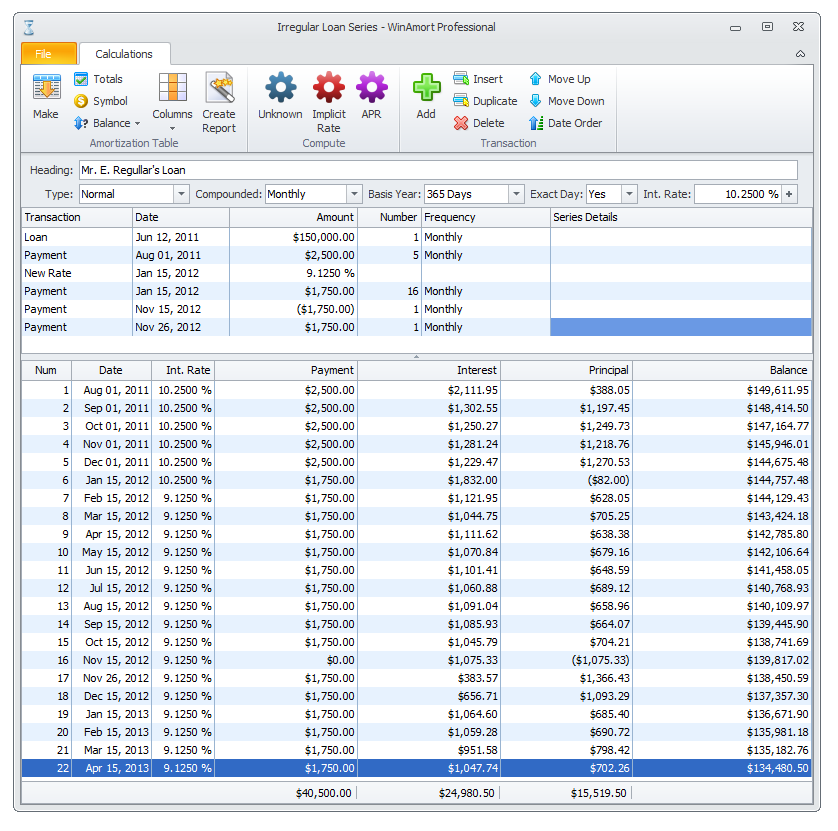
If you click on the Column Button at the top of the window and select to turn on the Loan Column, you will be able to see the first
entry with the $150,000 loan amount on the table.
When you are working with the Irregular Loan Form and Transaction, you can add, duplicate, delete or move any transaction line as needed.
Try moving the entries use the buttons.



